🌦️ WeatherDisplay – the most flexible weather app you can own
When you first start delving into the world of weather stations, you quickly realize that the software is just as important as the sensor itself on the wall. A good station isn’t much help if your data is locked away, poorly presented, or can’t be used the way you want. And this is where WeatherDisplay (WD) stands out. This is the app for those who want full control. Not “almost full control.” Not “some settings.” No—everything. WD is one of the most comprehensive weather apps available, and it shows.
🧩 What is WeatherDisplay—and who is it for?
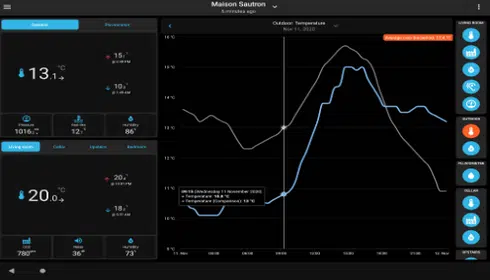
WeatherDisplay is a comprehensive system for collecting, logging, analyzing, and publishing weather data. It is designed for enthusiasts, weather stations, websites, and small institutions that need flexibility and power.
It's especially well-suited for those who:
- want to build your own weather website
- wants advanced logging and history
- uses multiple sensors or specialized equipment
- wants to integrate weather data into smart homes, websites, or other systems
- enjoys tinkering, customizing, and automating
If, on the other hand, you want a “plug-and-play” program with no settings, this isn’t the program for you. WD is for the curious.
🔧 Platform Support and Hardware
One of WeatherDisplay's greatest strengths is the breadth of its support:
Operating Systems
- Windows (from 98 to 11)
- macOS
- Linux
- Raspberry Pi
Supported Weather Stations
The list is almost comically long. Among other things, WD supports:
- Davis Vantage Pro/Pro2, Vue, and WeatherLink Live
- Ecowitt / Fine Offset
- Ambient Weather
- WeatherFlow Tempest
- Oregon Scientific
- La Crosse
- 1-Wire Sensors, LabJack, and Specialized Modules
In short: If you have a weather station, there's a good chance WD can communicate with it.
📡 Data Collection and Logging
WeatherDisplay collects data in real time and stores everything in detailed log files. You get:
- Continuous updating of all sensors
- auto-scaling graphs
- NOAA Reports
- Extreme Values and Statistics
- Import of METAR, SYNOP, and external sources
This makes WD a powerful tool for both hobbyists and those who need more professional-level computing.
🌐 Publishing and Integrations
This is where WD really shines. The program can publish data to virtually any weather network or website.
Uploading to Your Own Website
- Uploading graphs, tables, and HTML pages via FTP
- FreshWDL and WDL
- Custom templates with full HTML control
- Webcam support with time-lapse
Third-Party Services
- Windy
- OpenWeatherMap
- CWOP/APRSWXNet
- Weather Underground (new API)
- Windguru
- Ambientweather.net
- WeatherWizz
- MQTT for Smart Homes
This makes WD a dream come true for anyone who wants to build a comprehensive weather portal.
🔔 Notifications and Automation
WeatherDisplay can do more than just display numbers. It can respond.
- Email Notifications
- “Weather Voice” – Reading of Weather Data
- “Weather Answer Phone” – an answering machine with weather information
- Automated File Processing and Uploading
- Event-Driven Triggers
It's almost like having a small weather server working for you around the clock.
📷 Webcam and Image Processing
WD has built-in camera features:
- Direct Image Retrieval
- Automatic Upload
- Time-lapse generation
- Combination of weather data and images
Perfect for anyone who wants to display the weather visually on their website.
🆕 New Features
- Support for the Davis Air Quality Sensor
- Support for PurpleAir
- Improved support for WeatherLink Live
- NOAA NWS API Point Forecast
- Ecowitt Whittboy
- Updates for newer versions of macOS
💰 Price and License
WeatherDisplay costs $58 USD for a lifetime license. It's almost surprisingly affordable considering how much functionality you get.
🎯 Summary
WeatherDisplay isn't the simplest weather app—but it's undoubtedly one of the most comprehensive. It gives you full control over data, publishing, integrations, and automation. For those who enjoy building, customizing, and understanding weather data in depth, WD is a fantastic tool.